MS Genomics
The Microsoft Genomics Service task type allows for MS Genomics workflows to be executed as part of a Loome Integrate job.
Installing the MS Genomics Service
The MS Genomics task type will require the msgen CLI to be installed on
the agent’s host.
Installation instructions are available here.
The datagovernor/agent Docker Image does not currently come bundled with the MS Genomics service and so a custom image must be created to
allow for execution in Docker.
Creating a Microsoft Genomics Task
The MS Genomics task type requires 3 connections:
-
The Genomics Connection
- This is the service connection that is used for submitting the genomics workflow.
-
The Source Blob Connection
- This is the Azure Blob connection that is used for sourcing data that is used by the MS Genomics processor.
-
The Target Blob Connection
- This is the Azure Blob connection that is used for saving the output created by the MS Genomics Service.
On top of this, you must provide additional parameters which are used in the MS Genomics workflow.
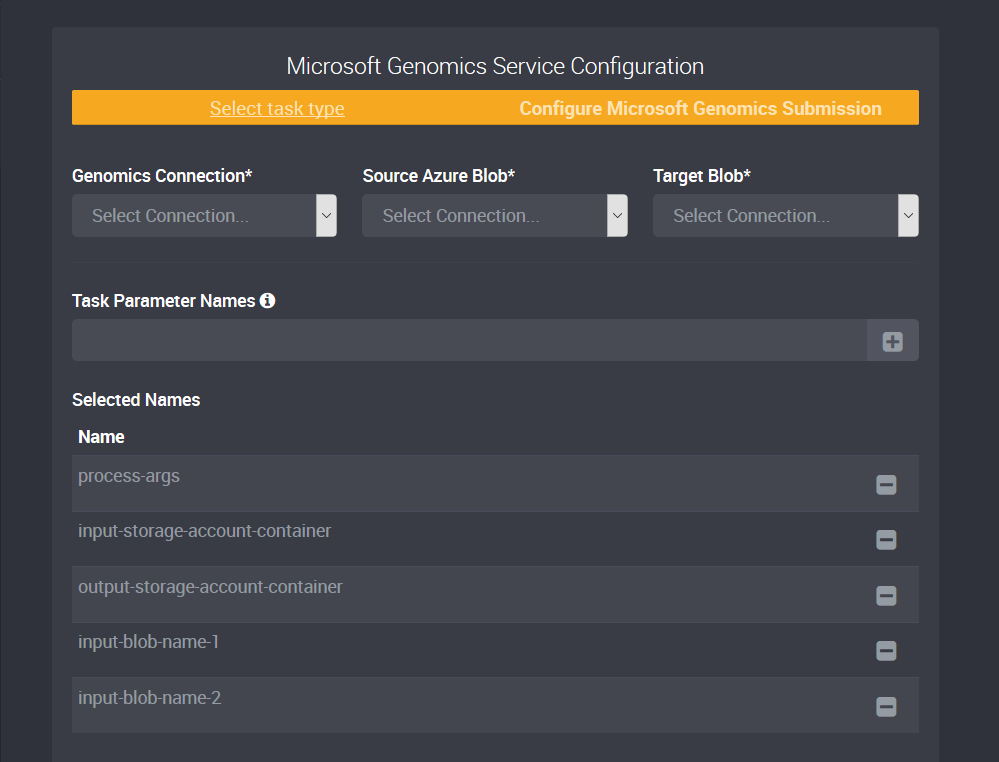
Required Parameters
To learn more about the MS Genomics processor parameters, read the Microsoft Python Client documentation.
| Param Name | Description | Example Value |
|---|---|---|
process-args |
Additional arguments to provide the MS Genomics Workflow. | R=hg191m1 |
input-storage-account-container |
The name of the container which has your input blobs. | inputcontainer |
output-storage-account-container |
The name of the container which will store the output from your msgen execution. |
outputcontainer |
input-blob-name-1 |
The name of one of the input blobs to pass into msgen. |
chr21_1.fq.gz |
input-blob-name-2 |
The name of one of the input blobs to pass into msgen. |
chr21_2.fq.gz |